Running
Let it work.
See the latest assistant activity without hopping between conversations. Running tasks stay visible while you focus elsewhere.
FREE · OPEN SOURCE · NATIVE MACOS
Keep the work moving. See what Codex is doing, what needs you and what’s ready—without opening every chat.
macOS 15+ · Early beta · Works with Codex Desktop
CODEX TASK MANAGER
2 running · 2 need you
Click the menu icon. Search, filter and open a task.
Fictional projects and tasks. No connection to your Codex account.
A live view of your tasks
Open the exact Codex chat
Keep related work together
Your task data stays on your Mac
A SMALL WINDOW INTO YOUR WORK
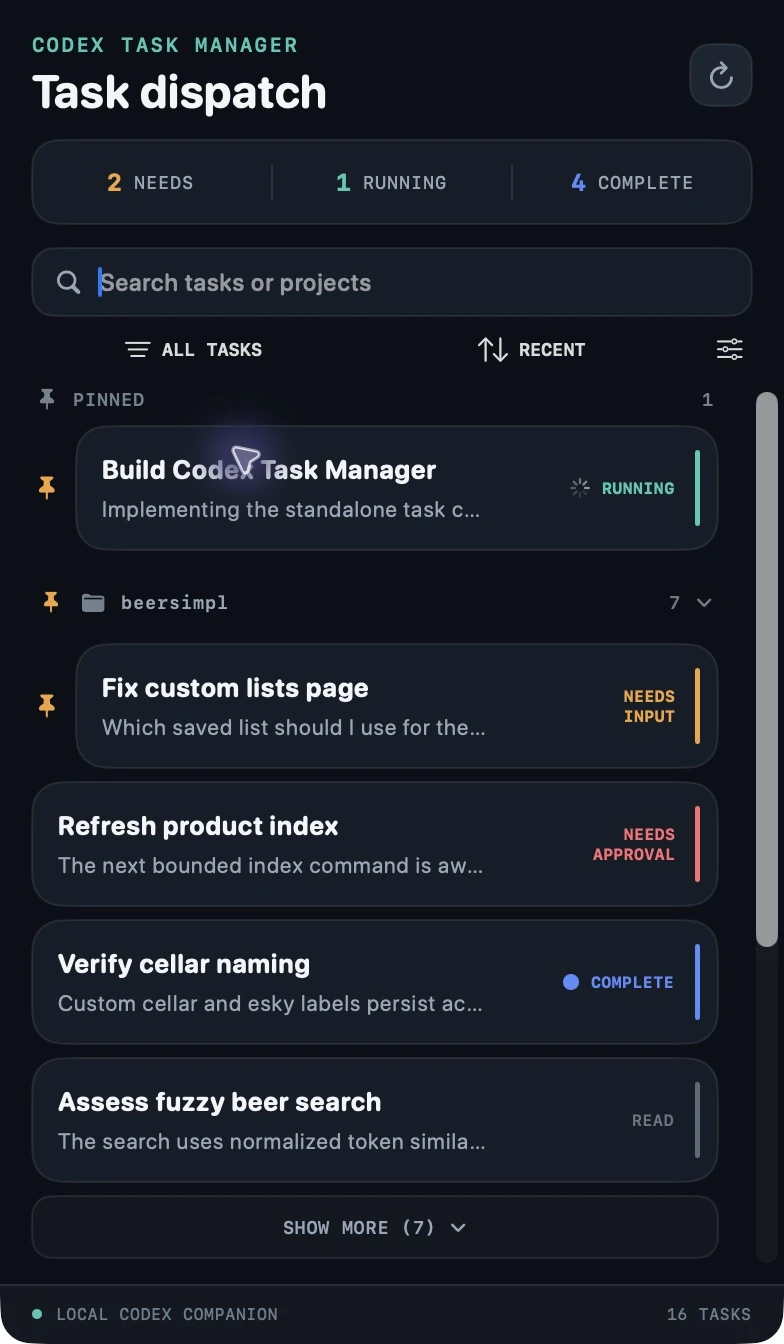
When several chats are moving at once, the next useful step should be easy to spot.
See the latest assistant activity without hopping between conversations. Running tasks stay visible while you focus elsewhere.
Find tasks waiting for an answer or approval. Open the exact chat in Codex and pick up where you left off.
Completed, unread tasks stand out in blue. Catch the result, review the work and move on with your day.
YOUR WORK, IN YOUR ORDER
Group tasks by project. Put pinned work first. See the latest message without losing the wider picture.
Switch between running, waiting, complete and idle tasks. Look at the work that matters right now.
Sort by recency, attention or project name. Use a custom project order and keep Codex pins at the front.
Every task card opens its original Codex chat. Your conversation stays in the place you started it.
LOCAL BY DESIGN
The app reads your local Codex task catalogue and activity files. It keeps its task view and preferences on your Mac.
No Task Manager account. No cloud task sync. No Accessibility permission required to read task status.
The “Allow all for this task” action changes permissions for the selected chat through Codex’s local interface. Use it deliberately; review individual approvals in Codex when you prefer.
Read the sourceA LITTLE LESS TASK SWITCHING
A free native companion for your Codex chats.
Early software, with rough edges. Task-status behavior is still being refined. Keep Codex as the source of truth.

INSTALL WITH HOMEBREW
brew install --cask JakeMawson/tap/codex-task-managerBeta 0.1.1 · Signed and notarized for your Mac.
New to Homebrew? Get Homebrew first ↗
After installing, open Codex Task Manager from Applications.
GOOD TO KNOW
A Mac with macOS 15 or later and Codex Desktop installed. The app uses the local Codex catalogue, so it needs access to your user’s Codex files.
It is a companion. It gives you a compact overview and opens tasks back in Codex. You still write prompts, review changes and make decisions in Codex.
The native app keeps task data local. This website uses aggregate usage analytics when enabled; its interactive demo uses fictional tasks and never reads your local Codex data.
This is an early beta. Task-status behavior is still being refined. If the menu item does not appear or a task looks stale, use Codex directly. You can report reproducible issues on GitHub.
Codex Task Manager is an independent tool from Simpl Industries. It is not affiliated with or endorsed by OpenAI. Codex is an OpenAI product.
Open an issue on GitHub ↗. Include the app version, macOS version and the steps to reproduce. Leave private conversation content and credentials out of your report.

SIMPLIFYING YOUR STACK